
Cabins USA Gatlinburg Availability Search Icon Availability Search Small Icon

Gray's Place

1 Bedroom Cabin
1 Baths / Sleeps 2
Gray's Place Cabin Rental Photo
back next
Featured Property Photo
Featured Property Photo1 Bedroom Cabin Near Pigeon Forge1 Bedroom Cabin Sleeps 2 with Gas FireplaceAffordable 1 Bedroom Cabin with King Bed1 Bedroom Cabin Sleeps 2 with Claw Tub1 Bedroom Cabin with Game Table1 Bedroom Cabin with Fully Equipped Kitchen1 Bedroom Cabin with Full BathroomAffordable 1 Bedroom Cabin Near Pigeon Forge1 Bedroom Cabin with Hot Tub1 Bedroom Cabin with Charcoal Grill

"Gray's Place" A 1 Bedroom Cabin Close to Gatlinburg with Hot Tub

Cabin Rental Details

Cabin Description

StarStarStar
1 Bedrooms, 1 Baths
Pigeon Forge Parkway, Cabin in Pigeon Forge, TN
  • 1 Level Cabin
  • BBQ Grill
  • Deck
  • Gas Fireplace
  • Hot Tub
  • WiFi Internet
  • Wooded View
  • Non Smoking
  • Washer/Dryer

Make the Smoky Mountains your next romantic destination with a stay at "Gray's Place." This 1 bedroom cabin close to Gatlinburg with a hot tub offers a quaint charm with comfortable amenities while keeping you close to everything that makes the Smoky Mountains such an exciting region to visit, ensuring a memorable way to reconnect with the one who matters most.

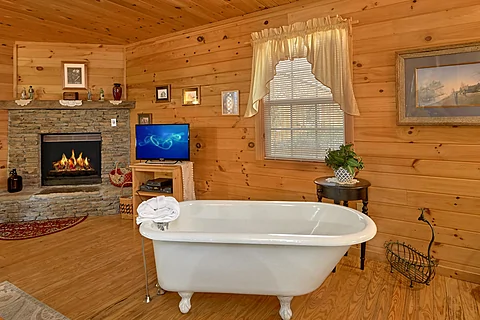
As you enter your 1 bedroom cabin rental near Gatlinburg with a forest view, you'll notice the inviting living room space with comfortable furnishings, a gas fireplace, and a flat-screen TV, perfect for relaxing with the one who matters most.

There's also an in-room bear claw tub for a more romantic ambiance, ensuring you can enjoy a relaxing bath in privacy. However you choose to unwind with your sweetie, you'll feel at home during your stay in "Gray's Place."

Instead of going out for a romantic dinner, you can use the nearby fully equipped kitchen to cook a full-course meal for two to share at the dining table. Once you're finished eating, it's time to go out and play in the Smoky Mountains.

Downtown Gatlinburg is only a short drive from your cabin rental, making it easy to start having fun with your partner. Explore top attractions such as Ober Gatlinburg, the SkyBridge, or Anakeesta. For something more date-like, consider visiting the local arts and crafts community or walking down the main strip to see what grabs your attention.

If you love nature, there are always sights like Cades Cove and the rest of the Great Smoky Mountains National Park to visit, making memories surrounded by nature's beauty.

Also close to your cabin is the Pigeon Forge Parkway. Here, you can enjoy attractions like The Island or Dollywood, among other fun options. Besides the many attractions, you'll find dozens of activities, live comedy shows, and shopping options throughout the Pigeon Forge area.

When not playing in the Smoky Mountains, you'll enjoy relaxing and taking it easy at your 1 bedroom cabin rental with a fireplace close to Gatlinburg. Spend time on the deck in the rocking chairs with your favorite drink, gazing at the wooded views surrounding the cabin for a quiet moment. Add to the moment by using the grill for a yummy cookout.

Nothing beats slipping into the cabin's hot tub for more relaxation. Feel the warm water soothe the day's aches and pains while planning the next exciting Smoky Mountain outing with your sweetheart.

Inside, you can curl up in front of the TV or snuggle by the fire for the perfect way to end the day.

Besides the standard amenities, you'll enjoy access to practical ones like Internet and a washer/dryer to keep the vacation running smoothly from start to finish.

Once you're ready to rest, you can look forward to sleeping in the king-sized bed near the living room for a good night's rest.

"Gray's Place" accommodates up to two guests, making the cabin ideal for a romantic getaway with the one you love most in the Smoky Mountains.

Experience romance and adventure simultaneously with your sweetie on your next Smoky Mountain vacation by grabbing your spot at "Gray's Place!" Book your 1 bedroom cabin close to Gatlinburg with a hot tub today to start making memories with your favorite person!

Cabin Photos

Featured Property Photo - Gray's Place1 Bedroom Cabin Near Pigeon Forge - Gray's Place1 Bedroom Cabin Sleeps 2 with Gas Fireplace - Gray's PlaceAffordable 1 Bedroom Cabin with King Bed - Gray's Place1 Bedroom Cabin Sleeps 2 with Claw Tub - Gray's Place1 Bedroom Cabin with Game Table - Gray's Place1 Bedroom Cabin with Fully Equipped Kitchen - Gray's Place1 Bedroom Cabin with Full Bathroom - Gray's PlaceAffordable 1 Bedroom Cabin Near Pigeon Forge - Gray's Place1 Bedroom Cabin with Hot Tub - Gray's Place1 Bedroom Cabin with Charcoal Grill - Gray's Place

Cabin Videos

Virtual Tour

Instructions:

Do you want to explore the cabins before you arrive? That's easy, thanks to our 3D Tour powered by MatterPort. Just press the Play button to get started. There are different viewing options available:

  • Dollhouse: Click the icon in the bottom left corner to enter this view. Click the same icon to return to first-person view.

  • Floor Selector: Click on the stacked square icon to change the floor level you view.

  • Floorplan: Click on the floorplan icon next to the dollhouse icon to view the floorplan for each floor level.

  • Measurement: Click the ruler icon to enter measurement mode. Upon entering this mode, click the plus sign to begin measuring whatever you want in the cabin.

Mobile Navigation

In first-person view, navigate through the cabin using the touch screen.

To look around, drag your finger left, right, up, or down. To move to another area, tap on the screen or the hollow white circles on the floor to move the direction you're facing.

To view in full-screen, click the far right icon to enter full-screen mode. Drag from the top of the screen and press the back button to exit full-screen mode.

To use measurement mode, after clicking the plus sign, press and hold to add your start point. Once done, press and hold to add your end point.

Desktop Navigation

In first-person view, use the arrow keys on your keyboard to move around the cabin.

The left and right arrows let you look around while the up and down arrows let you move forward and backward. Also, you can click on the hollow white circles to move to a specific point.

To view in full-screen, click the icon on the far right to enter full-screen mode. Press escape to exit full-screen mode.

To use measurement mode, after clicking the plus sign, click anywhere you want to add to your start point. Once done, click on another spot to add your end point.

Cabin Floor Plans

Availability Calendars

Guest Reviews

Overall Rating:  9.4 / 10

Location Maps

Cabins USA Gatlinburg Office Pin - Office Location
Property Location Pin - Cabin Location
Cabins USA Gatlinburg Official Logo
star star star star star
(865) 436-5031

VLS #157
Smoky Mountain Cabin Rentals
Guest Reservations
(800) 584-9872
2 Night Minimum


Cabins USA Gatlinburg Help Icon
Copyright 2013-2026, Cabins USA Gatlinburg, Gatlinburg, TN

Want to receive up to date information on cabin specials and events in the Smokies? Sign up for our newsletter! Simply provide a contact name and email so that we can reach you. Cabins USA Gatlinburg respects our guest's privacy and never shares this information with third-party sites. We treat any information that you share as confidential.

For each of the fields, please provide the following information:

There are several boxes that can be checked to broaden or narrow your search. Once you select your desired amenities or locations, simply click "search" to filter out available properties for your desired date. Once search results are provided, you can sort your results by bedrooms, name, rate, and rating.

After your first search, it isn't necessary to click the "search" button again as this feature will automatically filter your results for any new search features you provide, unless you change the date, the number of nights, or go to a new webpage.

It isn't necessary that you wait for a search to be completed before you select or deselect different search features.

When browsing results, you can add them to your "favorites" by clicking the red plus mark on the bottom left of your desired property. You can view your selected properties by click the "favorites" tab at the top of the search bar.

Add/Remove Favorites
When using our "search" feature, you can make a list of favorites. After doing an availability search for your desired vacation date, our site will produce a list of available cabins. Simply click the "+" sign on the lower left side of the property you are interested in.

Doing this will add the rental to your favorites list. You will notice that the "+" has now changed to a "-". You can click this minus sign to "unselect" this property from your favorites list.

You can also remove a property from your favorites list by clicking the minus sign to the right of the property name under the favorites tab. Additionally, you clear your favorites list by clicking "remove all" on the favorites bar. After doing this, you will have to perform a new availability search.
The number next to the favorites tab is the number of properties you have selected.

View List
To see all of your favorite rentals on one page, simply click "view list"

Compare Favorites
Under the favorites tab on the search bar, you can view your selected favorites. By checking the box next to your selected rentals, you can compare up to three properties.
Simply select the 2 – 3 properties you wish to compare, then click "compare" to see these rentals side-by-side.
Once you find your perfect rental for the right date, simply click "book now" to begin the booking process.